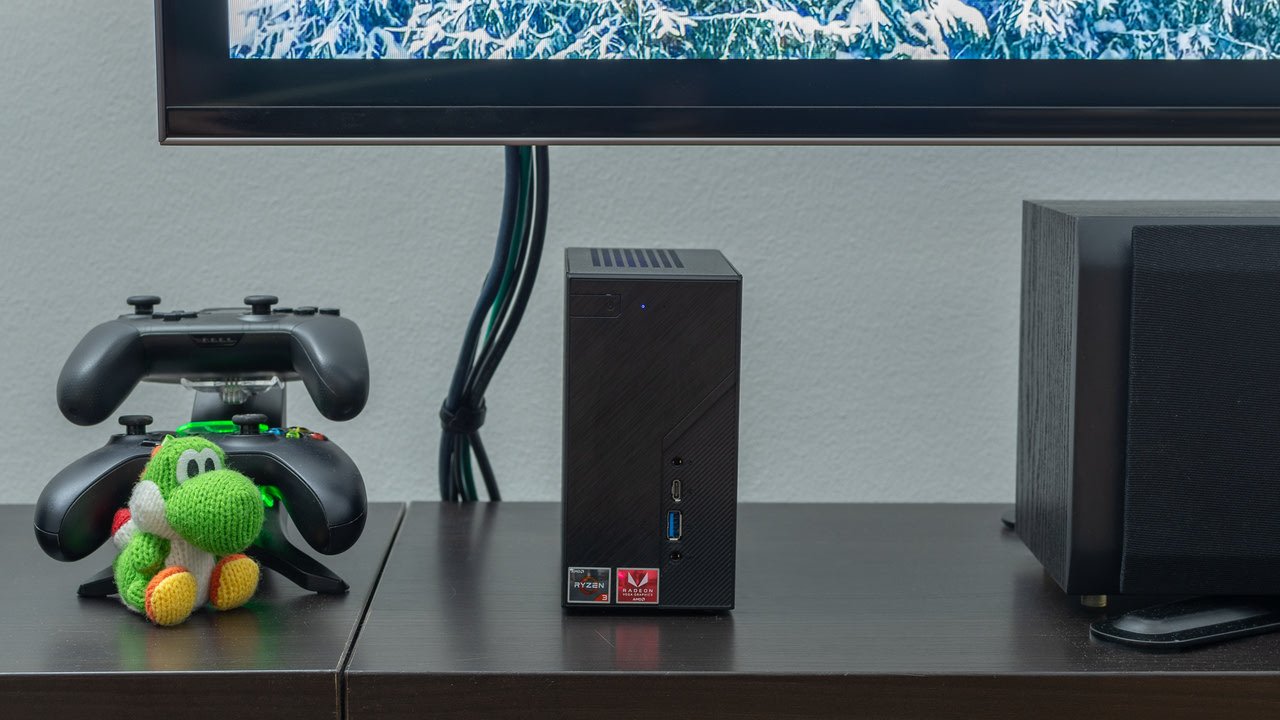
If you’ve ever wondered what is a home theater pc, you’re about to discover one of the most powerful tools for home entertainment. A Home Theater PC (HTPC) is a computer specifically designed to deliver movies, music, and streaming content directly to your TV or home theater system.
Unlike standard computers, an HTPC focuses on media performance, quiet operation, and seamless integration with your living room setup. Whether you’re a movie lover, gamer, or tech enthusiast, understanding how an HTPC works can completely transform how you enjoy entertainment at home.
Understanding What a Home Theater PC Is
Before diving into details, let’s clarify the concept in simple terms.
Definition and Core Concept
A home theater PC is a compact or full-sized computer connected to your TV and audio system. Its main purpose is to:
- Play movies and TV shows
- Stream online content
- Store large media libraries
- Provide a centralized entertainment hub
Think of it as a smarter, more flexible version of a streaming device.
How It Differs from Regular PCs
While a regular PC is built for general tasks like browsing and work, an HTPC is optimized for:
- Silent operation
- High-definition video playback
- Remote control navigation
- Living room aesthetics
This makes it ideal for entertainment-focused environments.
Key Features of a Home Theater PC
An HTPC stands out because of its unique features designed specifically for media consumption.
Media Playback Capabilities
HTPCs support:
- 4K and even 8K video playback
- Multiple file formats (MKV, MP4, AVI)
- High-quality audio formats like Dolby Atmos
This flexibility ensures you can play virtually any content.
Storage and Streaming Functions
With large storage options, you can:
- Store thousands of movies
- Organize TV shows
- Download and stream content
Additionally, HTPCs support platforms like Netflix and Amazon Prime Video.
Connectivity Options
Typical connectivity includes:
- HDMI or DisplayPort
- USB ports
- Bluetooth and Wi-Fi
- Ethernet
This ensures compatibility with modern devices.
Essential Components of an HTPC
Building or buying an HTPC requires understanding its core components.
Processor and GPU
A strong CPU ensures smooth performance, while a capable GPU handles:
- High-resolution playback
- Video decoding
- Light gaming
Storage Drives
You can choose:
- HDD (large storage, cheaper)
- SSD (faster performance)
- Hybrid setups
Cooling and Noise Control
Quiet operation is crucial. Look for:
- Silent fans
- Low-power components
- Proper airflow
Software Used in Home Theater PCs
Software is what brings your HTPC to life.
Media Center Software
Popular options include:
- Kodi
- Plex
- Emby
These platforms organize your media and provide a user-friendly interface.
Operating Systems
Common choices:
- Windows
- Linux
- Specialized HTPC systems
Each offers different levels of flexibility.
Benefits of Using a Home Theater PC
Now let’s explore why people invest in HTPCs.
Flexibility and Customization
You can tailor every aspect:
- Hardware upgrades
- Software customization
- User interface design
High-Quality Playback
HTPCs deliver:
- Superior video quality
- Advanced audio support
- Smooth playback
All-in-One Entertainment Hub
Instead of multiple devices, you get one system for:
- Movies
- Music
- Gaming
- Streaming
How to Build or Buy a Home Theater PC
You have two main options.
DIY vs Prebuilt Options
DIY:
- Fully customizable
- Often cheaper
- Requires technical knowledge
Prebuilt:
- Plug-and-play
- Easier setup
- Higher cost
Budget Considerations
Typical price ranges:
| Type | Cost |
|---|---|
| Budget HTPC | $300–$600 |
| Mid-range | $700–$1,200 |
| High-end | $1,500+ |
Setting Up Your HTPC
Once you have your system, setup is straightforward.
Connecting to TV and Audio System
Use HDMI for best results, or alternatives if needed.
Configuring Software
Install media software, organize files, and customize settings.
HTPC vs Streaming Devices
This is a common comparison.
Key Differences
| Feature | HTPC | Streaming Device |
|---|---|---|
| Flexibility | High | Limited |
| Cost | Higher | Lower |
| Performance | Powerful | Moderate |
| Customization | Extensive | Minimal |
Which One Should You Choose
Choose an HTPC if you want control and power. Choose streaming devices for simplicity.
Common Challenges and Solutions
Even great systems have challenges.
Compatibility Issues
Ensure your hardware supports modern formats.
Maintenance Tips
- Update software regularly
- Clean hardware
- Manage storage
FAQs
1. What is a home theater PC used for?
It’s used for streaming, playing media, and managing entertainment in one system.
2. Is an HTPC better than a smart TV?
It offers more flexibility and performance, but requires setup.
3. Can I build an HTPC on a budget?
Yes, basic setups can start around $300.
4. Do I need a powerful GPU?
Only for high-end playback or gaming.
5. Is it difficult to set up?
Not really—many guides and software tools simplify the process.
6. Can I use an HTPC for gaming?
Yes, depending on your hardware.
Conclusion
Understanding what is a home theater pc opens the door to a powerful and flexible entertainment experience. Whether you build your own or buy a prebuilt system, an HTPC gives you complete control over your media, superior playback quality, and endless customization options. It’s more than just a device—it’s the heart of a modern home theater setup.